
Time clock app: which digital time clock fits your team?


A time clock app lets employees clock in when they start and clock out when they finish on their own smartphone, so their working hours are recorded automatically. Where a punch card once went into a clock on the wall, most businesses now use a digital time clock: an app, a tablet at the entrance or a QR code on site. Which time clock fits best depends on where your team works. The recorded times land straight in your time tracking, ready for approval and payroll.
How does a digital time clock work?
A digital time clock records the moment an employee clocks in and out, and adds up the time worked per employee. The employee taps a button in the app, scans a QR code or signs in at a terminal. The system stores the start and end time and shows breaks, overtime and gaps to the manager.
The difference from an old-fashioned punch clock is what happens next. The hours appear in a digital overview straight away, the manager approves them and they go to payroll without retyping. If you first want to understand what a time clock is and when you need one, read our article on the time clock.
What types of time clock are there?
There are four types of digital time clock: a terminal at the workplace, a time clock app on a smartphone, a QR code on site and clocking in on a computer. Many businesses combine two types, for example a QR code in the workshop and the app for employees who work on the road.
Types of time clock compared
| Type of time clock | How employees clock in | Strong in | Best for |
|---|---|---|---|
| Terminal or tablet at the entrance | With a badge, PIN or button on a fixed device | One fixed spot where everyone clocks in the same way | Production, warehouses and shops with one location |
| Time clock app on a smartphone | With a button or timer in the app | Works anywhere, also at clients or on the road | Field technicians, home care and field staff |
| QR code on site | By scanning a QR code at the workplace with their own phone | Shows the employee was really on site, without extra hardware | Construction sites, cleaning and businesses with several locations |
| Clocking in on a computer | With a start and stop button in the web version | Quick for people who work at a screen all day | Office teams and hybrid workers |
A terminal needs a purchase and maintenance, and only suits a fixed workplace. A time clock app and a QR code work with the phone employees already have. That is why SMEs with several locations or staff on the road usually choose an app, sometimes combined with QR codes.
What are the pros and cons of a digital time clock?
A digital time clock gives you reliable hours without timesheets, but it does need clear agreements with your team. Put the pros and cons side by side before you choose.
Pros of a digital time clock
- You see in one overview who is working and how many hours have been worked.
- Employees no longer fill in timesheets, so nothing gets lost.
- Overtime and breaks are recorded objectively, which prevents discussions.
- Hours go to payroll without retyping.
- Employees see their own recorded times and can flag mistakes themselves.
Cons of a digital time clock
- Employees can forget to clock in or out, so you have to approve corrections.
- A terminal costs money and only works where it is installed.
- Some employees see clocking in as control if you do not explain why you use it.
- A time clock app needs a smartphone for every employee, or you arrange an alternative.
Most cons are solved with good agreements. Explain why you introduce a time clock, agree how employees correct a missed clock-in and let a manager approve those corrections.
What should you look for in a time clock app?
Choose a time clock app on ease of use, on how employees clock in and on how the hours are processed afterwards. An app employees do not understand leaves gaps in your records. Let a few employees try the app for a week first.
- Clocking in takes one tap or one scan, without training.
- The app supports several ways to log time: timer, QR code on site and desktop entry.
- Managers approve hours and corrections in the same overview.
- Overtime and allowances are calculated automatically based on your settings.
- Leave and sickness live in the same system, so you have one complete picture.
- The hours go to payroll through an integration or an export.
In many countries, employers must be able to show the working and rest hours of their staff. A time clock helps, because every record has a time stamp. Our article on whether time recording is mandatory explains what EU employers need to know. For the exact and current rules, check the official government guidance in your country.
Looking for a broader system than a time clock alone? Our comparison of the best time tracking software shows which type of solution fits your business.
How do you introduce a time clock without resistance?
You introduce a time clock without resistance by explaining up front why you do it, what you do with the data and what employees gain from it. Employees accept clocking in faster when they see their overtime is counted fairly. An example: an installation company with twenty technicians lets them clock in with the app at the first client of the day. The technicians no longer fill in a weekly timesheet on Friday and see for themselves how much overtime they have built up.
Start with a short trial with one team. Collect questions, adjust the agreements and then roll the time clock out to the rest of the business. Agree who can see which data, and keep only what you need for time tracking.
How the time clock works in HoorayHR
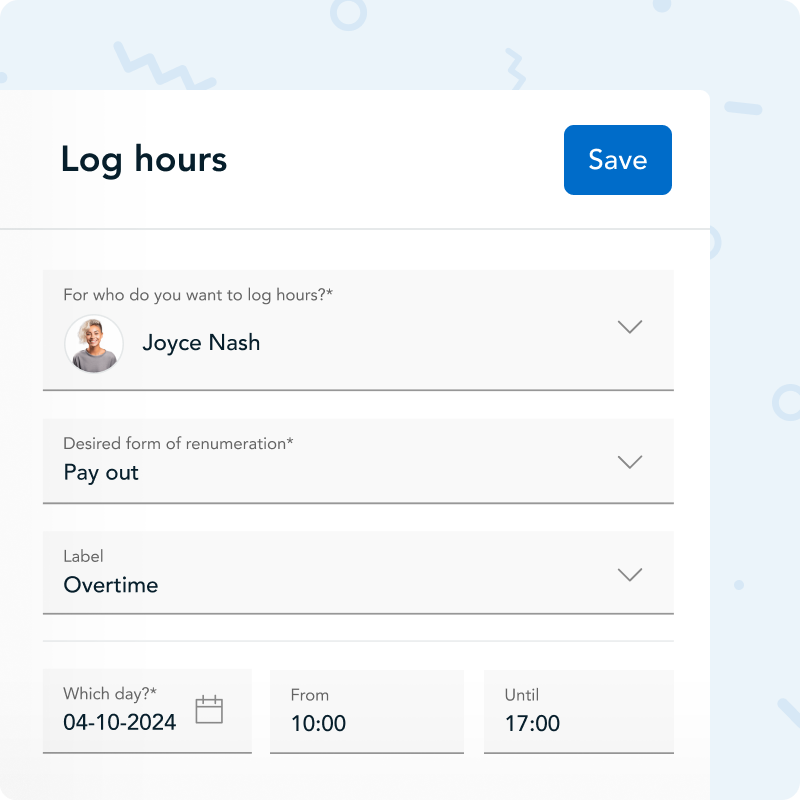
HoorayHR is all-in-one HR software for SMEs, where employees clock in and log hours in the same app they use to request leave. They start the timer in the mobile app, scan a QR code on site or log their hours on desktop. They label hours per project, so you see where the time goes.
Managers approve hours in one overview. We calculate overtime and the allowances you set, and approved hours go to your payroll software through an integration, which you find in our overview of integrations. Employees see their own hours in the time tracking app.
Pick the time clock that fits where your team works, not what used to hang on the wall. An app or QR code grows with you when you add a location or new employees, and the hours are ready for payroll straight away.
What is the difference between a time clock app and time tracking?
A time clock app records when an employee starts and stops working. Time tracking is the wider process: recording hours, labelling them per project, approving them and processing them in payroll. A time clock app is one way to track time.
Can employees use a time clock on their phone?
Yes, with a time clock app employees clock in and out on their own smartphone. That also works for people who work at clients or on the road. In HoorayHR, employees do this with the timer in the app or by scanning a QR code on site.
Can you require employees to clock in?
As an employer, you can agree with employees how they record their working hours, as long as you handle the data carefully. Explain why you use a time clock and who sees the data. Check the official guidance in your country for the exact rules, for example on consulting employee representatives.
What happens if an employee forgets to clock out?
If an employee forgets to clock out, the recorded time is wrong and needs a correction. Agree that the employee reports the right time and a manager approves the correction. That keeps your time records reliable.
Is a time clock app suitable for a small business?
Yes, a time clock app is especially useful for a small business, because nobody has time to chase timesheets. A time clock app works without extra hardware. All you need is the employee’s smartphone.

Written by
Ramon Glebbeek
Expert in HR
Ramon is a true expert in HR, thanks in part to his many years of experience at HoorayHR. With a passion for writing relevant blog posts and knowledge articles about HR, onboarding, performance management, and more, he offers a unique perspective on challenges and opportunities in the field. As an experienced human resources professional and content writer, Ramon is happy to share tips to help you save time on HR tasks and build a Great Place to Work.